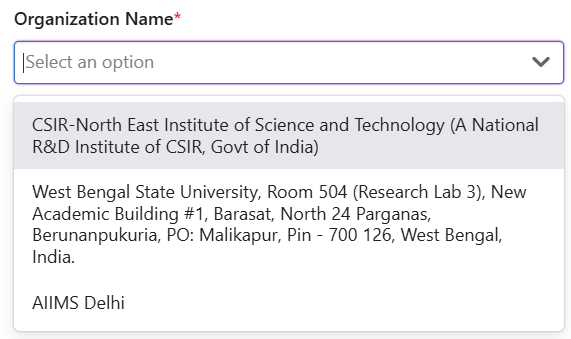
ReferencePaginateDropdown
Reference
- The
ReferenceAttributePaginateDropDowncomponent is a reusable dropdown component that supports asynchronous data loading and pagination. - It is designed to fetch and display a list of options dynamically based on user input or predefined filters
- Use this component when you need a dropdown that dynamically fetches data from the backend.
- Ideal for scenarios where the list of options is too large to load all at once.
- Supports advanced filtering and relationship-based queries.
Props and Their Usage
Required Props
-
instanceId(optional):- The ID of the current instance.
- Used to fetch connectable instances related to the current instance.
-
relatedTypeName:- The type of instances to fetch.
- Determines the type of data to be displayed in the dropdown.
-
config:- Configuration object for filters and query parameters.
- Includes:
stateFilter: Filters based on the state of instances.attributeFilter: Filters based on specific attributes.relationTypeNameandrelationDirection: Used to fetch instances based on relationships.
-
selectedReferences:- Pre-selected values for the dropdown.
- Used to display the initial selection.
-
onEdit:- Callback function triggered when the user selects or changes a value.
- Receives the selected value(s) as an argument.
Optional Props
-
onFocusOut(optional):- Callback function triggered when the dropdown loses focus.
-
placeholder(optional):- Custom placeholder text for the dropdown.
- Defaults to "Select an option" (single-select) or "Select some options" (multi-select).
-
customStyle(optional):- Custom styles for the dropdown.
- Merged with the default styles defined in
PicklistRenderStyling.
-
isDisabled(default:false):- Disables the dropdown if set to
true.
- Disables the dropdown if set to
-
isMultiselect(default:false):- Enables multi-select mode if set to
true.
- Enables multi-select mode if set to
-
menuPlacement(default:'auto'):- Determines the placement of the dropdown menu (e.g.,
'top','bottom','auto').
- Determines the placement of the dropdown menu (e.g.,
Key Features
- Asynchronous Data Loading: Fetches data from an API endpoint as the user types or scrolls.
- Pagination Support: Loads additional options when the user scrolls to the bottom of the dropdown.
- Single or Multi-Select: Supports both single and multi-select modes.
- Customizable: Allows customization of styles, placeholder text, and other behaviors.
- Integration with Backend: Fetches data using the
protrakApiClientand applies filters like state filters, attribute filters, and relation filters.
Example Usage
    <ReferenceAttributePaginateDropDown
      instanceId="12345"
      relatedTypeName="Task"
      config={{
        stateFilter: { states: ['Active', 'Completed'] },
        attributeFilter: {
          attributeGroups: [
            {
              AttributeFilterConditions: [
                {
                  AttributeName: 'Name',
                  Condition: 'Contains',
                  FirstValue: 'Test',
                  Operator: 'None',
                },
              ],
              Operator: 'And',
            },
          ],
        },
        relationTypeName: 'ParentChild',
        relationDirection: 'Outgoing',
      }}
      selectedReferences={[{ name: 'Task 1', id: '1' }]}
      onEdit={handleEdit}
      placeholder="Select a task"
      isMultiselect={true}
    />
Usage
const { protrakComponents } = React.useContext(customWidgetContext);
const { ReferenceAttributePaginateDropDown } = protrakComponents;
Example of config property:
{
    "fieldType": "Attribute",
    "attributeType": "Reference",
    "label": "Organization Name",
    "isVisible": false,
    "isEditable": false,
    "isRelatedTypeGeolocationAttribute": false,
    "attributeName": "TTInstitute",
    "relationTypeName": "InstituteToTechnologyTransfer",
    "relatedTypeName": "Department",
    "canCreateRelatedType": false,
    "relatedTypeTrackingRequired": false,
    "relationDirection": "From",
    "isRequired": true,
    "regExErrorMessage": "",
    "isMultiselect": false,
    "stateFilter": {
        "lifecycleName": "Department",
        "enforced": true,
        "states": []
    },
    "attributeFilter": {
        "attributeGroups": [
            {
                "operator": "None",
                "attributeFilterConditions": [
                    {
                        "attributeName": "InstituteShortCode",
                        "condition": "Contains",
                        "firstValue": "@User.STANDARDDivisionShortCodes",
                        "operator": "None"
                    }
                ]
            }
        ]
    },
    "allowValueCaptureFromScan": false,
    "linkOption": "SearchOnly",
    "actionSettingsShowAs": "Default",
    "editor": "Dropdown",
    "renderer": "Default"
}

  <ReferenceAttributePaginateDropDown
          selectedReferences={selectedOption}
          relatedTypeName={"Department"}
          isMultiselect={false}
          onEdit={(event) => onReferenceDropdownValueChange(event)}
          config={
            fields.filter((field) => field.attributeName === "DeptTOInv")[0]
          }
          placeholder={
            fields.filter((field) => field.attributeName === "DeptTOInv")[0]
              ?.placeholder
          }
    />
UI