pageContext
pageContext contains few properties that are common to all custom widget types (Any, HomePage, DashboardLayout, ViewLayout, EditLayout, CreateLayout, ReportLayout, ViewLayoutWidget)
Common properties in pageContext:
 {
   displayName: "Display name of the widget",
   name: "Unique name of the widget",
   userData: Object of logged in user details,
   settings: {
     dateTimeFormat: {
     dateFormat: 'M/d/yyyy',
     timeFormat: 'hmsa',
      //Tenant date and time format for rendering date and
     datetime values
     timeZone: '(UTC) Coordinated Universal Time'}
     //Tenant time zone
   },
   locale: {name: 'en-US', displayName: 'English (United States)'},
   //The tenant
   configured locale for number formatting.
   logoUrl: 'URL of the tenant logo uploaded in Admin: Tenant Settings'
 }
-
UserData:
userDatafrom pageContext provides following details:userData: {
userId,
name,
email,
roles : array of roles assigned to the user,
isAdmin : boolean to check if user has Admin role & permissions,
profile : object of the instance (user) details of type UserProfile,
typeInstanceId : instanceId for instance (user) of type UserProfile,
pictureUrl : url for user's logo
}profileproperty from UserData contains user instance details of UserProfile typeprofile: { id, name, instanceTypeName, attributes, accessType, lifecycle, state, allowedOperations, modified }
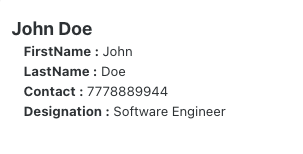
Sample Code to use userData:
 function UserProfileDetailsWidget(pageContext) {
   const { protrakUtils, protrakComponents } =
   React.useContext(customWidgetContext);

   const { Enums } = protrakUtils;
   const { Text, Box, H2 } = protrakComponents;

   const userDetailsAttrs = {
      FirstName: '',
      LastName: '',
      Contact: '',
      Designation: ''
   };
   const { userData } = pageContext;
   const userName = userData.name;

   if (userData && userData.profile){
     userDetailsAttrs.FirstName =
     userData.profile.attributes.find(attr => attr.name === 'STANDARDFirstName');

     userDetailsAttrs.LastName =
     userData.profile.attributes.find(attr => attr.name === 'STANDARDLastName');

     userDetailsAttrs.Contact =
     userData.profile.attributes.find(attr => attr.name === 'STANDARDPhone');

     userDetailsAttrs.Designation =
     userData.profile.attributes.find(attr => attr.name === 'STANDARDDesignation');
   }

   return (
      <Box style={{ display: 'flex', flexDirection: 'column', margin: '1rem' }}>
       <H2>{userName}</H2>
       {Object.keys(userDetailsAttrs).map(attr => {
        return (
          <Text>
            <b>{attr} :</b>{' '}
           {userDetailsAttrs[attr][getAttributeType(Enums, userDetailsAttrs[attr].type)]}{' '}
          </Text>);
         })}
       </Box>
     );
  }

 const getAttributeType = (Enums, attrType) => {
   switch (attrType) {
     case Enums.AttributeTypes.Boolean:
       return 'booleanValue';
     case Enums.AttributeTypes.Currency:
     case Enums.AttributeTypes.Numeric:
       return 'numericValue';
     case Enums.AttributeTypes.Date:
     case Enums.AttributeTypes.DateTime:
       return 'dateValue';
     case Enums.AttributeTypes.Text:
       return 'textValue';
     case Enums.AttributeTypes.Picklist:
       return 'arrayValue';
     case Enums.AttributeTypes.User:
       return 'userValues';
     case Enums.AttributeTypes.Reference:
       return 'referenceValues';
     default:
       return null;
   }
 };
Here's a preview of how this custom widget looks like: