Target type HomePage
The custom widget can be rendered in Home layout section/ group.
Coding guidelines
pageContextThe page context provided has following contentpageContextfor custom widget of type HomePage: common pageContext- As the widget is for Home layout where the section height is configurable, the widget CSS should be written so as to honor such configuration.
- Any API calls made from the widget will use the logged-in users' context.
Typical use cases
- Used in displaying custom widgets for the Home page. Role based visibility can be controlled by Home layout configurations.
- Typically used to show non-standard data visualization or user interactions that require data fetching or update requirements with additional business logic or validations.
Sample Code
- Here's an example of a home layout widget that:
- fetches instances of a particular type using in-built
useProtrakApihook and a custom promise function - displays a decorated link to each fetched instance using in-built
InstanceLinkcomponent.
- fetches instances of a particular type using in-built
function HomeWidget1(pageContext) {

  const getInstancesPromise = React.useCallback(() => {
    return {
      endpoint: "instances",
      config: {
        method: "GET",
        params: {
          instanceTypeName: "Agreement",
          getAllowedOperations: true,
          getAllowedActions: true,
          skip: 0,
          take: 100,
          attributes: ["Name", "Modified", "TrackingId"],
        },
      },
    };
  },[]);

  const { protrakUtils, protrakComponents } = React.useContext(customWidgetContext);

  const { useProtrakApi } = protrakUtils;

  const { state } = useProtrakApi({ requestConfig: getInstancesPromise });
  const { Box, Container, Spinner, Text, H2 } = protrakComponents;


  if (state.isLoading) {
    return (
      <Container>
        <Spinner />
      </Container>
    );
  }

  if (state.isError) {
    return (
      <Text color="ERROR">Error occured while fetching data...</Text>
    );
  }

  const DecoratedInstanceLink = ({ instance }) => {
    const { protrakComponents } = React.useContext(customWidgetContext);
    const { Box, Container, InstanceLink, H4 } = protrakComponents;

    return (
      <Container>
        <H4>
          {instance.name}
          <Box display="inline-block">
            <InstanceLink
              key={instance.id}
              typeName={instance.instanceTypeName}
              instanceId={instance.id}
              targetLayout={"view"}
              openInNewTab={true}
              showPopOutIcon={true}
            />
          </Box>
        </H4>
      </Container>
    );
  };

  if (state.data) {
    return (
      <Container direction="column">
        <H2 color="SECONDARY_LIGHT">{"My Agreements"}</H2>
        <Box direction="column" style={{ textAlign: "left" }}>
          {state.data.items.map((item) =>
            item.allowedOperations ? (
              <div key={item.id}>
                <DecoratedInstanceLink
                  key={item.id}
                  instance={item}
                  response={state}
                />
              </div>
            ) : null
          )}
        </Box>
      </Container>
    );
  }

  return null;
}
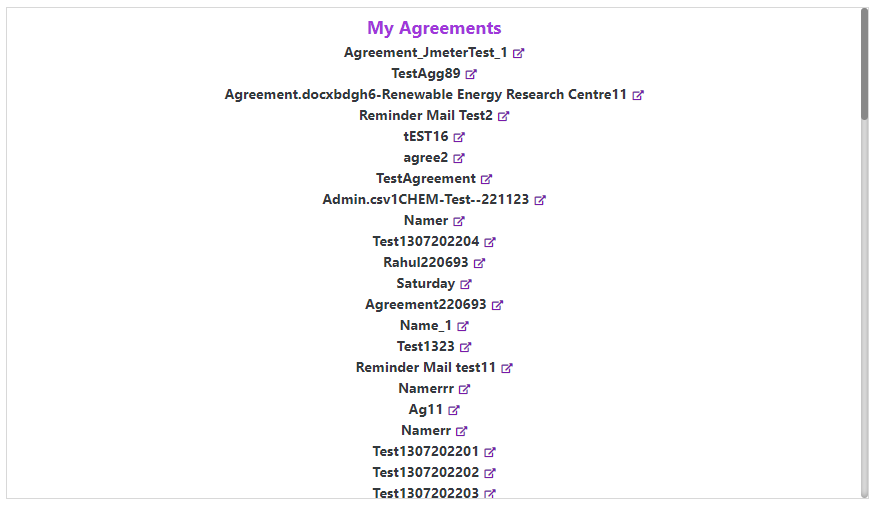
Here's a preview of how this custom widget looks like.