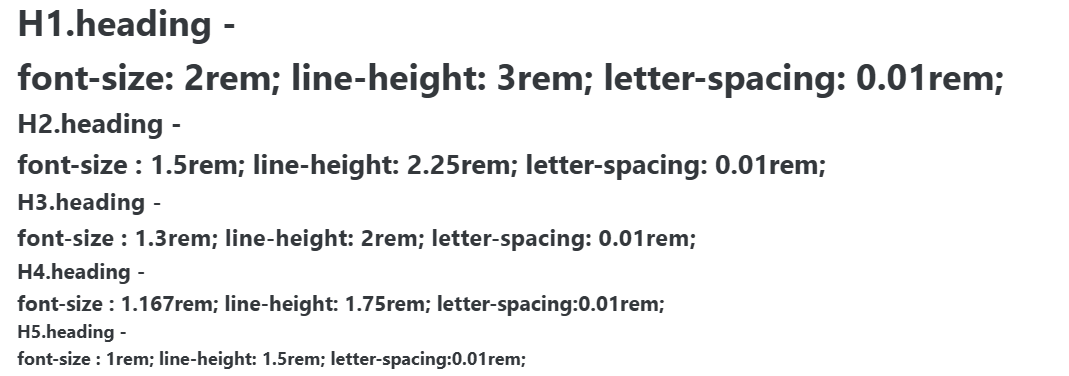
Headings
References
- Heading components like H1, H2, H3, H4, and H5 are typically styled versions of HTML heading tags
- They are used to define the hierarchy and structure of content on a webpage.
- In styled-components, these components are customized with specific styles and props for flexibility.
- It uses props to dynamically apply styles like font-size, color, margin, and font-weight.
- It also supports hover effects.
- To know more about heading : HTML Headings
Usage Example:
const { protrakComponents } = React.useContext(customWidgetContext);
const { H1, H2, H3, H4, H5 } = protrakComponents;

return(
        <H1>
          H1.heading - <br />
          font-size: 2rem; line-height: 3rem; letter-spacing: 0.01rem;
        </H1>
        <H2>
          H2.heading - <br />
          font-size : 1.5rem; line-height: 2.25rem; letter-spacing: 0.01rem;
        </H2>
        <H3>
          H3.heading - <br />
          font-size : 1.3rem; line-height: 2rem; letter-spacing: 0.01rem;
        </H3>
        <H4>
          H4.heading - <br />
          font-size : 1.167rem; line-height: 1.75rem; letter-spacing:0.01rem;
        </H4>
        <H5>
          H5.heading - <br />
          font-size : 1rem; line-height: 1.5rem; letter-spacing:0.01rem;
        </H5>
      </>
);
UI