Query Definition Configuration
This page explains how to configure Query Definitions for reference attributes, enabling advanced filtering and dependent reference behavior in Protrak.
Overview
A Query Definition allows you to control which instances are available for selection in a reference attribute. By configuring filters and parent dependencies, you can make reference attributes context-aware and dynamic.
Configuration
In the Admin Query Builder node, you can define query configurations that are later applied within reference attribute settings.
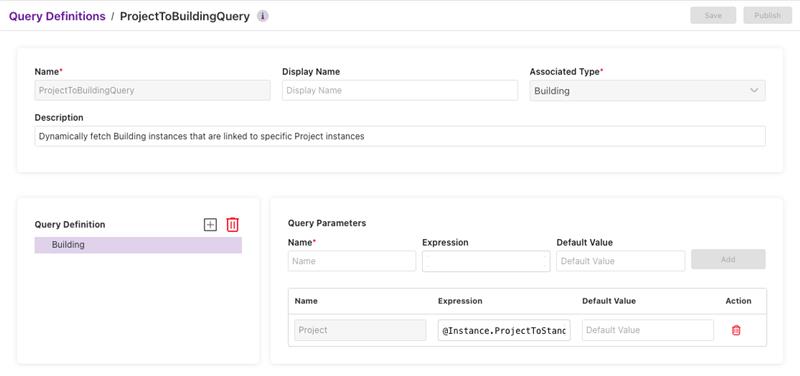
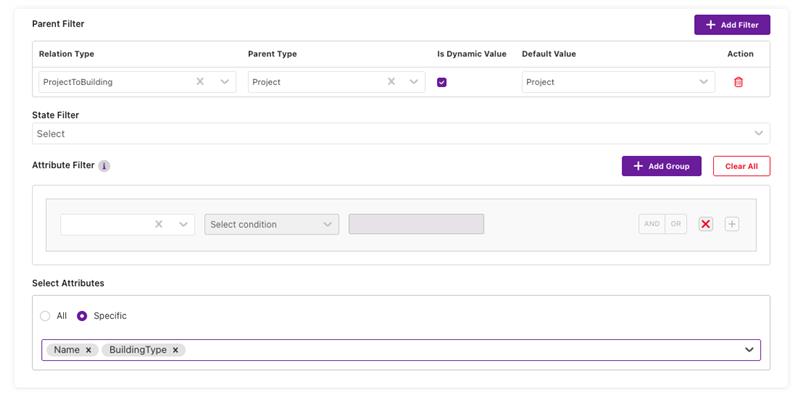
Key Fields in Query Definition
| Field | Description |
|---|---|
| Query Definition | In the Query Definition section, you can specify the primary type and related types that serve as the basis for further filtering and configuration. |
| Query Parameters | Customizable variable (name, expression, default value) for dynamic filtering or modifying query results. Query parameters are added as default values in parent and attribute filters, especially when Dynamic Value is enabled for parent filters. |
| Parent Filter | Makes the reference attribute dependent on another field (parent). Options change dynamically based on parent value. |
| State Filter | Restricts available options based on the state of the instance (e.g., Active, Inactive). |
| Attribute Filter | Filters options based on attribute values (e.g., only show items with specific properties). |
| Dynamic Value | If enabled, options update in real-time as parent changes. If disabled, options are filtered statically by selected parent instance. |
| Columns to Show | Select which attributes appear as columns in the reference selection list (default editor). |
Impact on Reference Attributes
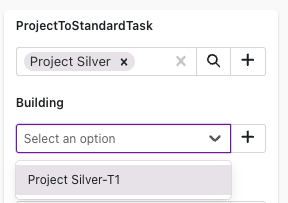
- Dependent Reference: When a parent filter is set, the reference attribute becomes dependent. The available options update based on the parent field's value.
- State & Attribute Filters: These filters further restrict the list of selectable references, making the selection more relevant and manageable.
- Dynamic vs Static Filtering:
- Dynamic: With Dynamic Value enabled, the selection list updates instantly as the parent changes.
- Static: With Dynamic Value disabled, options are filtered once based on the selected parent instance.
Example: Dependent Reference Attribute
Best Practices
- Use parent filters for context-aware selection.
- Combine state and attribute filters for precise control.
- Select meaningful columns to display in the selection list.
- Enable Dynamic Value for real-time updates, or disable for static filtering as needed.
For more details, see Dependent Reference Attributes.