Rules Configuration Guide
This page provides comprehensive guidance on configuring powerful attribute filters in business rules. Attribute filters allow you to define conditions that determine when a rule should be applied.
Attribute Filter Groups and Filter Conditions
Attribute filter groups allow you to organize multiple filter conditions using logical operators:
- AND: All conditions in the group must be true
- OR: At least one condition in the group must be true
You can combine multiple filter groups using logical operators:
- AND between groups: All groups must evaluate to true
- OR between groups: At least one group must evaluate to true
Filter Conditions and Value Configuration
Each filter condition consists of the following components:
- Attribute Context: Instance or User context
- Attribute Name: The specific attribute to evaluate
- Condition: The comparison operator that varies by attribute type
- Values: The values to compare against, which can be static or dynamic
For configuring condition values, the interface provides the following controls:
- First Value Checkbox: Enables dynamic value type for the first value (when unchecked, the first value is treated as static)
- First Value Input Box: Where you enter the actual value (can be static text/number or dynamic reference like @Instance.AttributeName or @User.AttributeName)
- Second Value Checkbox: Enables dynamic value type for the second value (visible for conditions like "Between")
- Second Value Input Box: For entering the second value used in range conditions following the same static/dynamic rules
The checkbox determines whether the corresponding input box value should be treated as static (literal value) or dynamic (attribute reference). Both first and second values can independently be configured as static or dynamic.
Attribute Types and Supported Conditions
The following table shows which conditions are available for each attribute type:
| Attribute Type | Supported Conditions |
|---|---|
| Text, Reference and basic attributes: Name, TrackingId, TrackingInfo, Geolocation, Description, State, TypeName, QRCode, Lifecycle, GeofenceCenter, GeofenceRadius | Equals, Not Equals, Contains, Not Contains, Is Empty, Is Not Empty, In |
| Numeric, Currency | Equals, Greater Than, Greater Than Or Equal, Less Than, Less Than Or Equal, Between, In, Is Empty, Is Not Empty |
| Date, DateTime and basic attributes: Created, Modified, LastAccessedDate | Equals, Greater Than, Greater Than Or Equal, Less Than, Less Than Or Equal, Between, Today, Last One Week, Last One Month, Last One Year, Next Week, Next One Month, Next One Year, Is Empty, Is Not Empty |
| Picklist | Equals, Not Equals, Contains, Not Contains, Is Empty, Is Not Empty |
| User and basic attributes: Creator, Modifier, LastAccessedBy | Equals, Not Equals, Contains, Not Contains, Context User, Is Empty, Is Not Empty |
| RichText | Contains, Is Empty, Is Not Empty |
| Boolean | Equals |
| Attachment | Is Empty, Is Not Empty |
Static vs Dynamic Values
| Value Type | Description & Examples |
|---|---|
| Static Values | Fixed values that remain constant. Examples: • Text: "Active", "Pending", "Approved" • Numbers: 100, 50.5, 0 • Dates: 2024-01-01, 2024-12-31 • Boolean: True, False • Multi-line: For "In" conditions, separate values with new lines |
| Dynamic Values | Values that reference other attributes. Examples: • @Instance.AttributeName: @Instance.Created, @Instance.State • @User.AttributeName: @User.Name, @User.Department |
Dynamic Value Examples
- @Instance.State - References the State attribute of the current instance
- @User.Department - References the Department attribute of the current user
- @Instance.Created - References the Created date of the current instance
- @Instance.PhoneNumber - References the PhoneNumber of the current instance
- Instance.State - Missing @ symbol
- @Instance State - Missing dot separator
- @User. - Missing attribute name
- @Instance.NonExistentAttribute - Attribute doesn't exist
- @Instance.MultiselectUser - Multiselect User attribute (not allowed)
Date Mnemonics
Date Mnemonics provide a powerful way to configure dynamic date values for Date and DateTime attribute filters. This feature allows you to create relative date filters that automatically adjust based on the current date.
Instead of setting fixed dates that become outdated, use date mnemonics to create filters that automatically adapt to the current date when the rule is evaluated.
Date Mnemonic Syntax
Date mnemonics are represented using the '$' symbol followed by a function name and optional operators:
Basic Format: $FunctionName()
With Operators: $FunctionName(+/-NumberSpecifier)
Operators:
- + : Add time to the base date
- - : Subtract time from the base date
Time Specifiers:
- d : Days
- w : Weeks
- m : Months
- y : Years
You can modify date mnemonics using operators and time specifiers to calculate relative dates:
Example: $StartOfToday(-2d) means 2 days before today
Available Date Mnemonic Functions
| Mnemonic Function | Description |
|---|---|
$StartOfToday() | Returns the start of the current day (00:00:00) |
$StartOfWeek() | Returns the start of the current week (Sunday 00:00:00) |
$StartOfMonth() | Returns the start of the current month (1st day 00:00:00) |
$StartOfYear() | Returns the start of the current year (January 1st 00:00:00) |
Date Mnemonic Examples
| Date Mnemonic | Description |
|---|---|
$StartOfToday(-2d) | 2 days before today (day before yesterday) |
$StartOfToday(+3d) | 3 days from today |
$StartOfWeek(+7d) | Next week (7 days from start of current week) |
$StartOfMonth(+2w) | 2 weeks from the start of current month |
$StartOfYear(+1y) | Start of next year |
Configuration Examples
Examples using static first and second values
- Instance name should contain "urgent"

- Instance created in last week

- Instance version between 1 and 5

- Instance Creator is current user

Examples using dynamic first and second values
- Instance country should equal User's country

- Users creator equals instance creator

- Instance creator equals instance modifier

- Instance AnnualRevenue between the instance Loss and Instance Profit

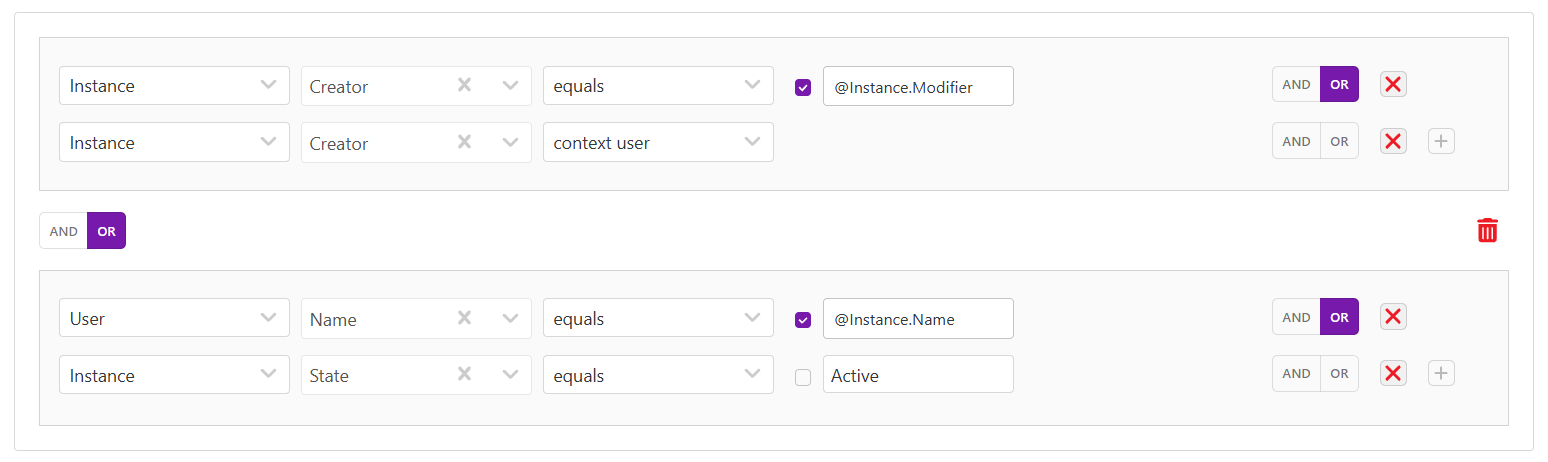
Complex Multi-Group Logic Example
Group 1: Instance Creator equals instance Modifier OR instance creator is modifier
OR
Group 2: User Name equals instance name OR Instance state equals "Active"
This demonstrates how multiple groups can be combined with different logical operators to create sophisticated rule conditions.
Dynamic Values Limitations and Validation
1. Attribute Selection Restrictions
- Filter Attribute: You can select any attribute from all available attribute types
- First and Second Values: You can only select attributes that have the same type as the filter attribute
- Example: If you select a Text type attribute for filtering, you can only select Text type attributes in First and Second values
2. Multiselect Attribute Restrictions
- User Attributes: Multiselect User attributes cannot be configured in First and Second values
- Picklist Attributes: Multiselect Picklist attributes cannot be configured in First and Second values
- Reason: These attributes contain multiple values and cannot be directly compared
3. Value Requirements
- Mandatory Values: First and Second values are mandatory when their input boxes are visible
- Conditions without values: Today, Last One Week, Last One Month, Last One Year, Next Week, Next One Month, Next One Year, Context User, Is Empty, Is Not Empty
4. Dynamic Value Format Validation
- Correct Format: @Instance.AttributeName or @User.AttributeName
- Examples: @Instance.State, @User.Department, @Instance.Created
- Invalid Format: If the format is incorrect, the Save button will remain disabled
- Server Validation: Additional validation occurs on the server side during save operation
5. Error Handling
- Client-side: Invalid dynamic value format disables the Save button
- Server-side: Validation errors are displayed with relevant error messages during save
- Type Mismatch: Server validates that referenced attributes exist and have compatible types
6. Runtime Access and Null Value Considerations
- User Access Requirements: When configuring instance or user attributes in rule conditions for display conditions and conditional formatting, ensure the current logged-in user has access to those instance and user attributes
- Null Value Handling: Verify that attribute values are not null for the referenced attributes, as null values will cause the condition to evaluate to false
- Access Control Impact: If the user lacks access to the referenced attributes, the rule condition will evaluate to false regardless of the actual attribute values
- Best Practice: Test rule conditions with different user roles and permission levels to ensure proper behavior across all user contexts
Best Practices
- Choose Right Conditions: Use appropriate conditions for each attribute type
- Validate Dynamic Values: Ensure proper format (@Instance.AttributeName or @User.AttributeName)
- Type Matching: Always use attributes of the same type in comparisons
- Avoid Multiselect: Do not use multiselect User or Picklist attributes in First/Second values
- Group Logically: Put related conditions in the same group
- Use "In" for Multiple Values: More efficient than multiple OR conditions
- Leverage Negation: Use "Not Equals" and "Not Contains" for exclusion filters
- Consider Performance: Complex conditions may impact system performance
Dynamic values are evaluated at runtime, providing flexibility for context-aware rules. Available conditions depend on the selected attribute type. Always test configurations thoroughly before production deployment. Server-side validation will provide specific error messages for invalid configurations.